AutoGUI
AutoGUI is a quick-and-dirty way to add a GUI to a non-interactive command line program, utilizing wxPython. It is not a substitute for a genuine GUI, but in the absence of knowledge or desire to learn the vagaries of GUI programming, one can throw together a form that shows the most important functions of a given program and arrange them in a way that takes advantage of spatial orientation in very few lines of code.
Check out this example script to see how it works in practice.
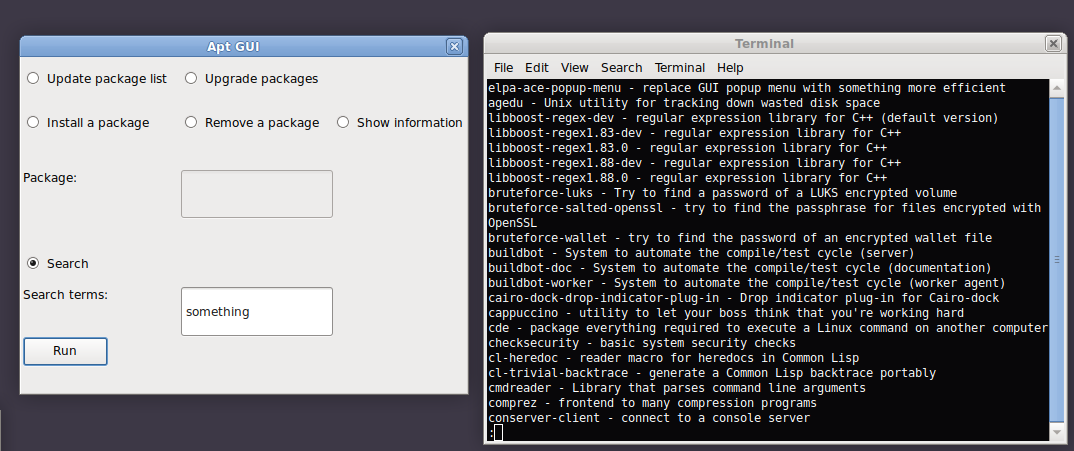
In this "interface" one selects a radio button that specifies a mode of operation, or just a "Mode", which controls what single operation is run; then one can check checkboxes and/or enter text or select files, and then finally click the "Run" button to execute the command. The output will appear in a new terminal window, which will stay open until the user presses a key or exits the window.
In terms of code, it all converges at the "runapp" command:
runapp (command, widgets, title)
With runapp one specifies a base command that prepends any given operation. "command" here can be blank if each Mode is a different base command altogether. One would then pass it a list of "widgets", meaning a list of Modes, Options, and Parameters, and finally a string, "title", which will title the window.
Mode (command, label)
The Mode class takes a command (or the second part of a command), and a text label to be presented to the user in the GUI. It produces a radio button that dictates which controls will be active.
Option (option, label, modes)
The Option class produces a checkbox, which represents a command line flag that doesn't take user input (e.g., "--help"). The "modes" parameter is a list of Modes, represented by the command attached to that Mode. E.g., for the Mode assigned the command "apt-get install", one would pass an Option applicable to that Mode the list ["apt-get install"], to make that control active in that Mode.
Parameter (prefix, suffix, label, modes, filepicker=False)
The Parameter class produces either a textbox or a filepicker button, determined by the parameter "filepicker", which defaults to False. "label" and "modes" operate as described above. "prefix" and "suffix" are strings that say what to prepend and append to the user's input; e.g., if the desired result is "--output [whatever the user entered]", then one would pass the prefix "--output", and pass an empty string for the suffix.
The layout is almost completely automatic. All Parameters will take up one full row, and all Modes and Options will take up one of three columns in a row. Pass "None" as a widget to add an empty cell for padding purposes.
You can get the source here: autogui_src.tar.gz
And a Debian package here: autogui-1.0.deb