A Different View on Desktop GUI Minimalism
So to (hopefully) close out this rather unintentional quadrilogy of posts about How I Use My Computer, let's re-examine the "minimal GUI interface," not through the lens of an idealized, from-the-ground-up imagining of a minimalist GUI but through one of "what is it that I need at a minimum, in any given environment, simple or complex?" I want to look inward, as it were. As I concluded in my last post about this, time marches on, and the possibility exists that I'm not always going to have my ideal computing environment; moreover, my conception of ideal in this space has changed and will likely continue to change. For really what I'm seeking is the ability to work a certain way, not that all the widgets and such work exactly the same way. There's only a small set of capabilities I need from my operating system's GUI in order to establish my normal workflow, so let's tally up what these capabilities are.
The most obvious place to start is the window manager. It needs to be a floating window manager; I can't stand tiling. I have a bodily need to arrange. I need to be able to raise windows on click, which I think literally every existing window manager has covered. I also need to be able to do one or more of the following: lower a window, shade a window, and/or get a scaled-out view of all open windows. Basically, I need to be able to get at any given window on my screen without displacing any of them, so minimization/hiding isn't sufficient. Lower-on-click is probably the most niche of these features, but it also happens to be my favorite; along with the basic click-to-raise it's like you're rearranging windows in 3D space. Nondisplacement is important, as my aforementioned bodily need to arrange my windows is hampered by the instability brought by having to put one window somewhere else temporarily to find another. Here I'm in luck, as I think basically every modern platform has at least one of these features.
Another element of window management is how to manage huge swaths of windows, or "meta window management", one could call it. As the screenshots in my first two posts on this subject will attest, I originally just ignored the problem and muscled through, lowering and shading as necessary to get at the things I needed. It's not as difficult to manage as one may think, but it does run up against a task-oriented workflow quite a bit, as one has to make available a large group of windows and make unavailable another large group to move from one overall task to another. I denied multiple desktops for my dislike of sudden context switching, but sometimes you want a context switch. And what's more fun than setting up one workspace? Setting up two, of course! And so, I've embraced multiple desktops. At the moment I only need two, one for general internet stuff and then this one, for "whatever other project I have going on," which currently is writing this very essay. I could indeed have more in the future, should I be juggling several different projects. I briefly experimented instead with the classic Mac OS-style application-level window raising as I mentioned in my last essay on this subject, but this is a harder feature to come by in arbitrary environments, whereas multiple desktops are again provided by anything reasonably modern, and ultimately this window raising policy isn't quite as useful.
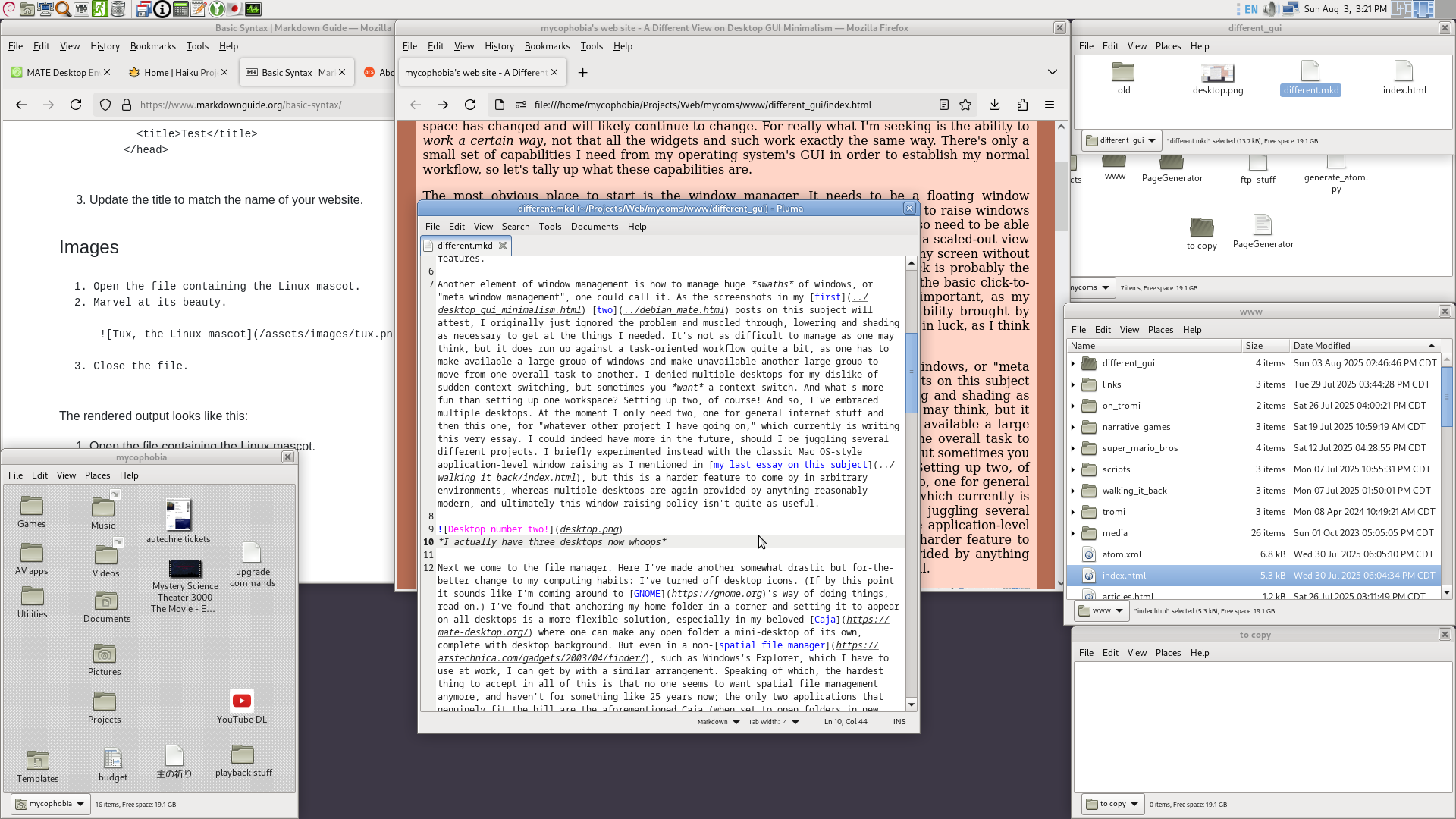 I actually have three desktops now whoops
Next we come to the file manager. Here I've made another somewhat drastic but for-the-better change to my computing habits: I've turned off desktop icons. (If by this point it sounds like I'm coming around to GNOME's way of doing things, read on.) I've found that anchoring my home folder in a corner and setting it to appear on all desktops is a more flexible solution, especially in my beloved Caja where one can make any open folder a mini-desktop of its own, complete with desktop background. But even in a non-spatial file manager, such as Windows's Explorer, which I have to use at work, I can get by with a similar arrangement. Speaking of which, the hardest thing to accept in all of this is that no one seems to want spatial file management anymore, and haven't for something like 25 years now; the only two applications that genuinely fit the bill are the aforementioned Caja (when set to open folders in new windows) and Haiku's Tracker. It is what it is. In any case, I can still mention less esoteric features I need in order to work the way I want to work.
Firstly, I need the file manager to be able to launch programs without making it a huge pain in the ass. (Strike one for GNOME Files; you can only open scripts from a context menu selection, and it will always throw up a terminal window even if it's not a terminal-based script.) In the Linux world, this also means proper handling of .desktop files, which are basically complicated shortcuts. (Strike two for GNOME Files; if there's a way to launch a .desktop file from it, I haven't figured it out.) The reason for this is that, for a user, for me, applications, files and folders are all just things. They're the things I need at a given moment to accomplish a particular task, and for me to be productive in this regard, to be properly task-oriented, I would like to be able to arrange them in some logical relationship to each other. I shouldn't be required to distinguish between application and file in my ordinary goings-on; these are utterly useless distinctions to me right now.
Most often this means opening files directly and letting the associated programs take over, but sometimes it means opening programs themselves directly; in the top-right of the screenshot above, I've set up my folders in such a way that I can drag-and-drop different.mkd on top of PageGenerator to generate a near-finished html file in the origin folder, ready to upload. When I've gone to my www folder to update my site's index.html to show the new thing I did, I can then double-click generate_atom.py to update my RSS feed. I don't have to write a GUI for any of this, I don't have to pop open a terminal window, I can just directly manipulate the tools I need to do the things I need to do. Here, Windows Explorer of all things actually has one up on Caja: I can drag and drop anything on top of any file in Explorer and it will do its damnedest to open that anything with the target file, and so I can just make batch files as drag targets; Caja, on the other hand, will only allow .desktop files to be used as non-folder (or non-folderlike) drag targets, and so I have to make one if I'm dealing with, say, a self-authored script instead of an installed application. Not a huge deal, though. At least it's possible at all, unlike in GNOME Files. (Sensing a theme here?)
If my file manager can't be truly spatial, then at the very least I need to be able to open folders in new windows without it being a whole thing, and to minimize the level of window chrome as much as possible at my option. Windows Explorer allows me to always open folders in new windows, though it pops up an annoying ribbon toolbar when a window gains a certain amount of width or height. GNOME Files only lets you open folders in new tabs by middle-clicking them, after which you can detach them into new windows. As if to put a definitive nail in the coffin on top of all its other shortcomings, it also only hides its gigantic sidebar based on window width. It used to have a button that allowed you to show or hide it at will, but apparently having a button is too confusing for users, and so they'll just let you know when the sidebar can be safely hidden thank you very much.
Finally, we come to the wildcard of "an omnipresent, customizable space for quick access to arbitrary items." This is most often a panel of some kind, but it could just as easily be fulfilled by a menu or a dock or even a folder window set to always-on-top and pinned to all desktops. Something close to the ideal is, unsurprisingly, provided by MATE's panel, where I can drag and drop anything in a file manager to it and it makes a launcher, which I can then move anywhere I wish and optionally lock its position in. It would be nice to have labels for these icons too as otherwise its utility for folders is rather limited unless I go through the trouble of assigning an icon to each one I want to pin, but otherwise it's almost perfect. In any case, I also have my home folder down there for fully labeled icons if I need it. With a flexible panel system, where I can have as many or as few panels as I want and I can put them anywhere on the screen, and a truly spatial file manager such as Caja, there's a very uniquely precise kind of workflow synergy here that is much more difficult to obtain in other environments.
Windows has less capacity for this, as I don't believe I can pin files and folders to the start menu, nor the quick launch bar, so at work I end up mostly relying on the Desktop folder I have open in a screen corner. So it falters a bit on omnipresence, but it is at least customizable and can be populated with arbitrary items.
GNOME fails utterly here. Files has a special folder in which all "Starred" files and folders live, whose window I could pin to all desktops, but given that applications are, at best, a huge pain to launch from Files, it doesn't suffice as a quick access space for a truly arbitrary item selection. Instead, I have to go to the Dash, within the modal Activities overview containing most of GNOME's widgets, to get at any pinned applications. Well that's fine, we can make that work, right? Just put frequently used files and folders in the Dash! Except no, that's impossible. I can only pin applications, from the overview's applications grid, to the Dash. So I necessarily always have to go to Files for files and folders and Overview for applications.
At every turn, GNOME is bound and determined to force me to reckon with a logical delineation between "the applications" and "my files", where such a distinction is almost never useful in the course of daily tasks. GNOME, in its defaults, simply utterly lacks anything approaching "an omnipresent, customizable space for quick access to arbitrary items." Neither its shell nor its file manager are up to the task. It's things like this along with the inflexibility of Files that point to why so many find fault with GNOME on principle, I think: There's not really any way to make it yours; not in the sense that there's few preferences or that you can't apply custom themes, as these are at least positions that, on the part of GNOME, I feel are somewhat well-justified and that I can sympathize with. It's the fact that I can't genuinely orient myself toward a particular task without having to roll over several cognitive speed bumps along the way. I have to engage with at least two different interfaces to even facilitate doing something non-trivial. It's not that it would be impossible for me to get work done in GNOME, but Good Lord would I be fighting it tooth and nail along the way to make it possible. If GNOME just had the tiniest bit of give in terms of making Files and the Activities overview more integrated, I'd have a lot less to complain about.
Like, think about this: Why do the people who like desktop icons, like them? It's not because they just looove covering up all of their icons with open windows, it's because in the modern desktop computing landscape, it's the last bastion of spatial file management. One places icons where they wish, on the desktop; there's rarely limitations on this. Furthermore, it's the easiest place to intermingle application launchers and files and folders; most panel menus will offer an option to pin an app to the desktop in one way or another. A user can make their working environment uniquely their own at least in this way. GNOME's decision to nix desktop icons is a sensible one, but their continued neglect of a space in which a user can just throw a bunch of arbitrary stuff severely hinders its usability. You can't make a one-size-fits-all desktop environment that offers no flexibility in the overall workflow. The user is always a variable.
I don't want to exclusively bash GNOME here, though. KDE has its own polar opposite problem, in that I can technically work the way I want to in it without having to install extensions or replace interface-fundamental bits with others, but there's just so much going on. It resembles less an integrated desktop environment and more a ramshackle clutter of UI parts; it looks as though it would fall apart if I sneezed on it. Dolphin is certainly more capable than GNOME Files, but the context menus are all a mile long and any action resulting a new window for a folder is more clicks and/or keyboard shortcuts away than I'd like. KDE makes me downright nervous with how configurable it is; it's a nightmarish army of widgets coming at me from every side. There's something to be said about having a singular vision, and while I fundamentally disagree with GNOME's in some aspects, at least they have one. Honestly if it came down to it, I would pick GNOME over KDE and just use a different file manager.
XFCE and Cinnamon effortlessly clear the window management bar, and their respective file managers Thunar and Nemo are generally fine. Nemo in particular is pretty close in functionality to Caja given they're based on the same old Nautilus (ironically now GNOME Files) code, it just doesn't have the spatial features. The Cinnamon panel is a bit less flexible and a bit more annoying with regard to adding items to it than MATE's, but it's workable. I could use either of these environments without much complaint.
And so, that's about it. Specifics of implementation aside, all I really need is a window manager with an option for in-place window shuffling and multiple desktops, a file manager that lets me nontrivially have multiple folders open and can run programs, and a robust, omnipresent quick-access space. With my weird anxieties about the future of computing assuaged by the fact that these feature in any modern desktop environment, at least with a couple of tweaks or different choice of file manager, maybe I can make good on my promise from two essays ago and never write about this stuff again. I wouldn't count on it though!